
Breaking the Flutter Release Cycle with Server-Driven UI
# Breaking the Flutter Release Cycle with Server-Driven UI
Picture this: it's the week before Diwali, and marketing wants to change one thing on the home screen.
20% OFF → 30% OFF.
Easy, right?
In a normal Flutter app, that one-line change can still mean a new build, store review, and rollout. And the festival isn't going to wait for the App Store.
So we asked: what if that change didn't need a new app release at all?
That's where server-driven UI comes in.
We built our Flutter setup with Stac, where the app ships with the widgets it knows how to draw, while the server decides which screens to show and how they're put together. The UI lives as JSON, so changing an existing screen can happen without shipping a new binary.
In this post, we'll walk through why we chose Stac, why we ended up forking it, how stac watch made development much faster, and just as importantly what still requires a store release.
We Didn't Build SDUI From Scratch. Here's Why.
We found Stac the way most teams find a tool. Long release cycles wore us down, and we went looking for a way out.
Our first attempt was simple. We saved each UI element as JSON, gave it a key, and mapped that key to a matching widget in our template. Then we wrote lookup logic to connect the two. It worked, but it was inefficient and it didn't scale. That's when parsing JSON straight into Dart widgets started to look like the right idea, so we searched for packages that already did it. That search led us to Stac.
How Stac works
Stac lets you keep writing screens as Flutter code. A screen is a Dart function, so the analyzer checks it, the IDE autocompletes it, and the output is plain JSON.
The build step is short. stac build finds every function marked @StacScreen, runs it, and turns the screen into JSON the app can fetch.
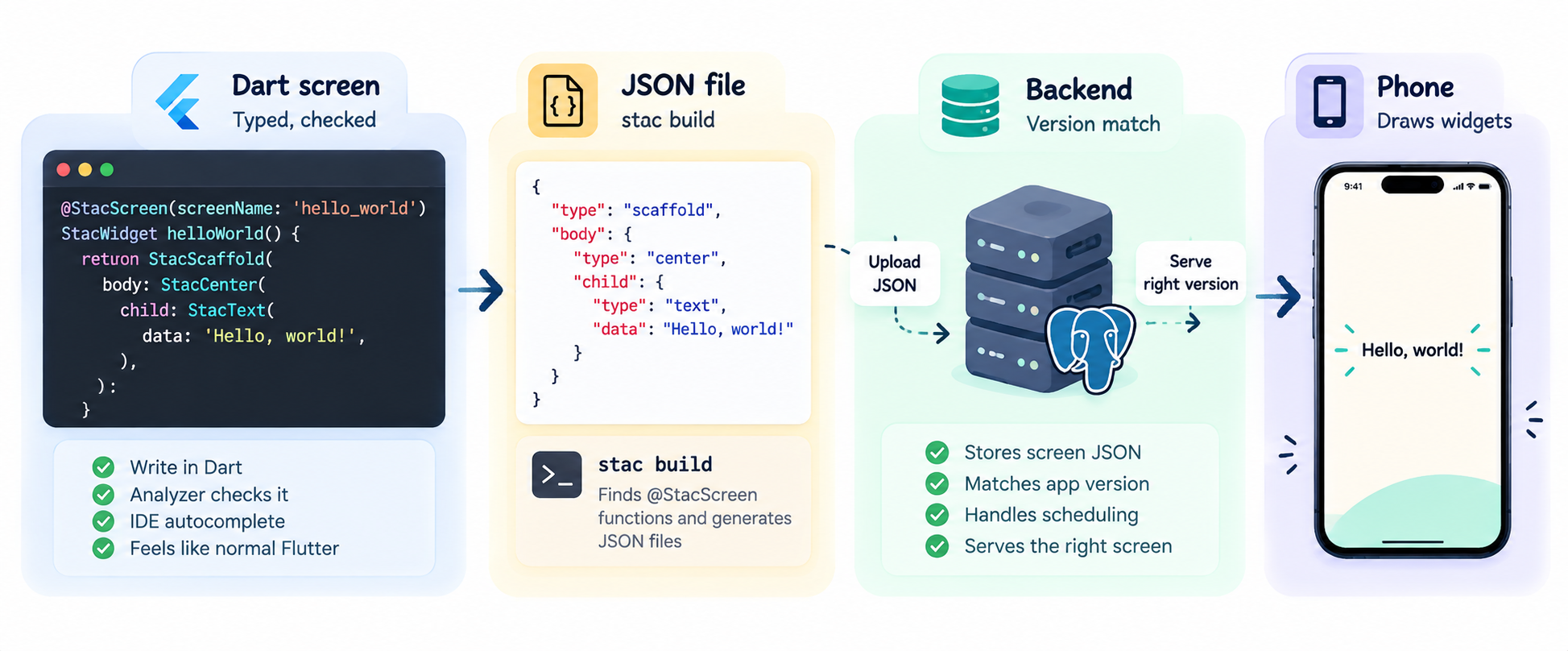
The screenName in @StacScreen becomes the name of the generated screen. The JSON keeps the same structure as the Flutter widget tree. A StacScaffold becomes a "scaffold" node, a StacCenter becomes "center", and a StacText becomes "text". Constructor arguments become fields on those nodes. If you know Flutter's widget tree, you can read the JSON. It is the same hierarchy in a format the server can store, version, schedule, and send to the app.
There is one catch. Screen files run under plain dart run, so they can't import Flutter and have to stay pure Dart. That's why colors are hex strings from a name map, and why Flutter types such as Curves get plain Dart equivalents that the parser converts back when it renders the UI.
The whole flow fits in one line.
Write the screen in Dart, build it into JSON, serve the JSON, and let Flutter draw it.
Teaching the app new widgets and actions
The server can only ask for what the app already knows how to draw, so sooner or later you need a new widget or action. Each one is a pure Dart model plus a Flutter parser. A scaffolding script creates both, adds the export, and registers the parser.
Registration is the step everyone forgets. An export alone registers nothing, and the failure is a quiet one. You get no error, and the widget just doesn't show up.
class StShowOfferActionParser extends StacActionParser<StShowOfferAction> {

  @override
  String get actionType => 'apply_offer';

  @override
  StShowOfferAction getModel(Map<String, dynamic> json) =>
      StShowOfferAction.fromJson(json);

  @override
  Future<void> onCall(BuildContext context, StShowOfferAction action) async {
    FestiveController.to.apply(action.festiveKey);
  }

}
The real parser also shows a snackbar and can navigate afterwards, but this is the basic shape.
Stac Got Us Close. Then We Needed More.
For the app to use these screens, the JSON files have to be hosted somewhere. Stac offers a cloud option. You run stac deploy, and the parse widget fetches the JSON from Stac Cloud and renders it in the app. We wanted to host the JSON on our own server, and that was the first reason to fork. Here is the full list of changes.
- We wired our own backend into the Stac widgets, so they fetch widget JSON from our server instead of Stac Cloud.
- We configured the Stac CLI to fit our workflow.
- We added new widgets for responsive layouts.
- We added commands to the Stac CLI that create skeletons for custom widgets and actions. And registered them in the app.
`stac create widget <Name> [category] [subdir...] [--inject-data]` stac create action <Name> [category] [subdir...] [--inject-data]
- We built HMR (Hot Module Reload) to fix a slow development loop. Developers had to build the widget JSON, deploy it, and restart the app to see a change. With HMR, the app reloads the widget JSON whenever it changes. More on that below.
- We introduced the wildcard page for campaign routes. We needed a new route to show special offer items, but route names have to exist in the compiled app, so JSON can't invent one. Without a fix, every new campaign would need a release.
One Route, Every Campaign
The fix is a single route, wildcard_page, which we register once in the app. It renders whichever child page the JSON asks for, so a new campaign becomes new JSON instead of a new release.
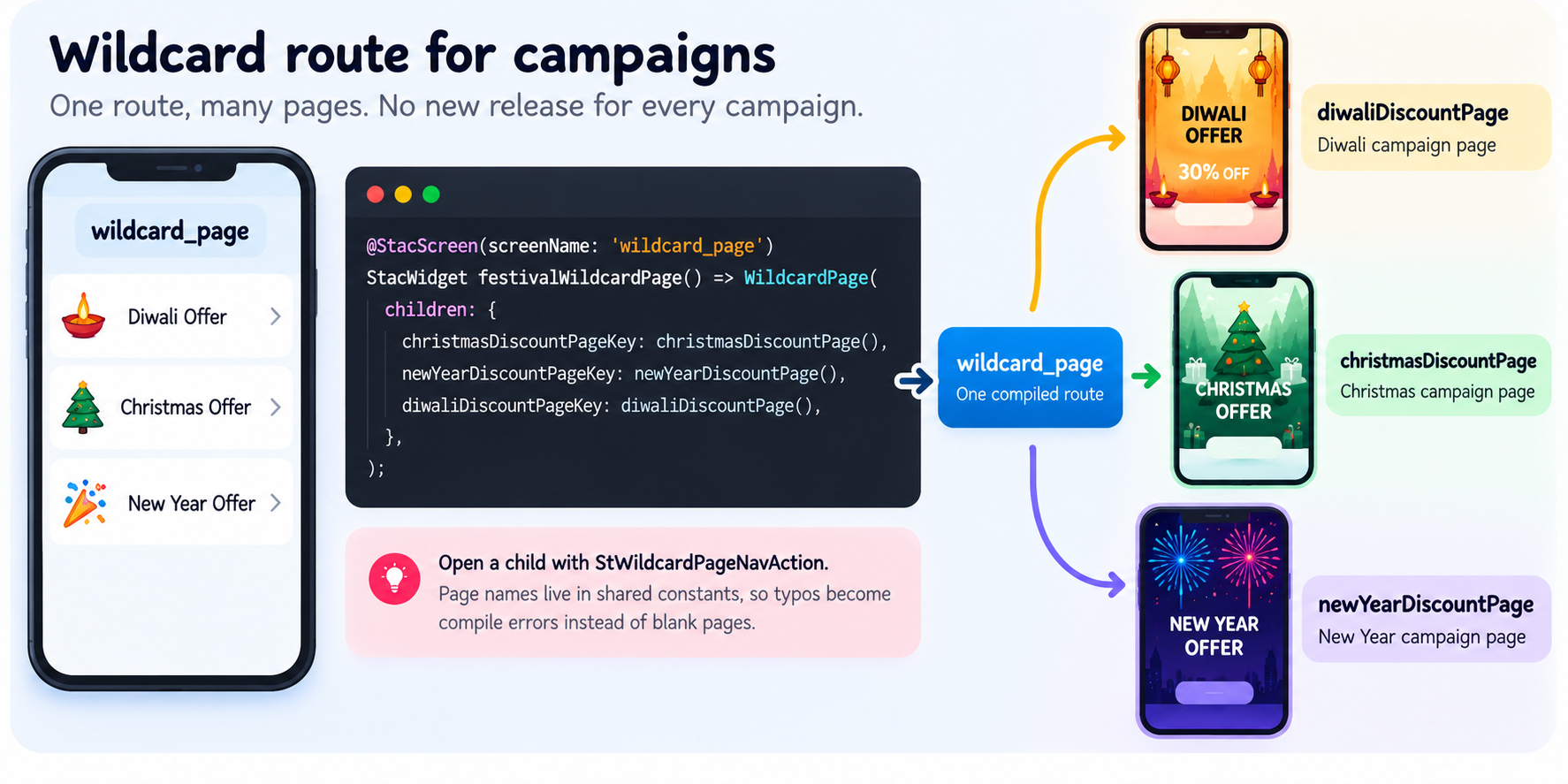
You open a child page with a typed action, StWildcardPageNavAction, which writes the argument key for you. The page names live in shared constants, so a typo becomes a compile error instead of a blank page in production.
Making the dev loop painless with HMR
Our original loop was build, deploy, open the app, and repeat. It got tedious fast, so we built stac watch around the idea of HMR to replace it. You start it once, save a file, and your device updates.
Four details make it work.
- Reverse import graph. A save rebuilds only the screens that depend on the file you changed.
- Build hashing. Every build is hashed. If a save produces identical JSON, the reload is skipped instead of refreshing the device for nothing.
- Safe failures. If a build fails, the error prints and the last good JSON stays live, so a typo never blanks your screen.
- Flutter daemon reloads. Reloads go through the Flutter daemon. The one exception is themes, which trigger a full restart because they resolve at startup.
The JSON reaches your devices through Tailscale Funnel, so emulators, simulators, and real phones all use the same HTTPS URL. One warning, because we would want to be told too. Funnel makes that URL public, so only serve screens you are fine with strangers seeing.
The Hard Part: Old Apps Meet New JSON
Now for the harder problem. When screens lived inside the binary, a screen and the code that draws it always shipped together. JSON breaks that pairing. A user on last month's build can't draw this month's widget, and people update on different days, so the backend can't hand everyone the newest document.
Keeping Old App Versions Safe
Each row in app_screens holds one document and an app version range. The app sends its version on every fetch, and get-latest returns the active row whose range contains that version.
When a screen needs a new widget type, we deploy it with a higher minAppVersion. Older binaries keep getting the previous JSON. The deploy also trims the older row's maxAppVersion, so the ranges never overlap.
Here is how the active rows for one screen look after three deploys.
| Row | jsonVersion | minAppVersion | maxAppVersion | Active |
|---|---|---|---|---|
| A | 1.0.0 | 1.0.0 | 1.3.99 | Yes |
| B | 1.1.0 | 1.4.0 | 2.1.99 | Yes |
| C | 1.2.0 | 2.2.0 | empty (no upper limit) | Yes |
Deploying row B with minAppVersion 1.4.0 cut row A's maxAppVersion to 1.3.99. Deploying row C cut row B's the same way. Each app version matches exactly one row.
| App version sent | Row served |
|---|---|
| 1.2.0 | A |
| 1.4.0 | B |
| 2.1.5 | B |
| 2.5.0 | C |
Build it, schedule it, relax
Our backend can schedule pages, so a page can be built weeks ahead and go live on a date you choose.
You send the JSON with a start date, an end date, and makeLatest. With makeLatest: false, the row stays inactive until its window opens. A cron endpoint runs daily. It activates rows whose window covers today and deactivates the ones that have ended. When a row ends, the highest-version non-scheduled row takes over again.
That is how any campaign page works. We build it in September, schedule it for specific dates, and it appears and disappears without anyone touching the app or the backend that day.
So, What Still Needs the Store Release?
Anything compiled into the binary still goes through the store. That includes parsers, actions, controllers, and the logic inside them.
Our festival pricing shows where the line sits. Banner copy, layout, and images are JSON, but the discount rules live in a const map in the app. Changing the banner from 20% to 30% is free. Changing what the cart actually charges needs a release. Moving that discount map behind an endpoint is next on our list.
Things We Learned the Hard Way
- Pin the Stac dependency to a tag or commit. Tracking
maincan change what you resolve months later.
- Every wildcard child ships in one payload, so split into a second wildcard route once it grows.
- Sub-pages can't be deep linked unless you pass the argument yourself.
- Pushing JSON to our backend is still a separate step from
stac build.
A Few Things You Might Be Wondering
Can I add a new widget type without a store release?
No. The widget needs a parser in the binary. Ship the parser in a release, then use the widget in JSON with a higher minAppVersion.
What do users on old app versions see?
They get the latest JSON whose version range contains their app version. They never receive a payload that uses a widget their build can't draw.
Can a campaign page be deep linked?
Not by default. Children of the wildcard route open through their typed action, so a deep link has to pass the argument key itself.